Diagrams & geometry
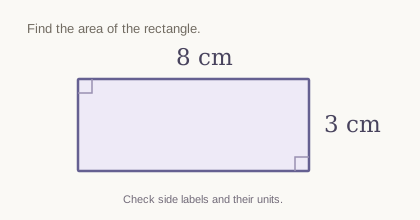
8 cm or 3 cm?Check which measurement belongs to which side, along with units and diagram relationships. A readable label still needs the right interpretation.
A small misread can change the whole answer. Upload your homework photo or PDF, choose Sol to review what it detected, then get a step-by-step solution from the readings you confirm.
Opens the existing StudyHelpAI solver. Sol review requires a verified account and credits; the total is shown before you start.
See a checked example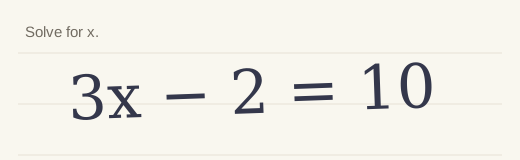
3x + (misread plus sign) 2 = 10
Compare the reading with your original before confirming it.
The minus was read as a plus. Solving that misread would give x = 8/3. The original equation gives x = 4.
In Sol, cancel an incorrect review and upload a clearer source. Review the new reading before solving. Readings cannot be edited in place.
Original synthetic example with an intentionally wrong reading. This is a teaching illustration, not a live AI result.
Visual AI can miss a decimal, crop a label or confuse a handwritten sign. Sol separates reading the source from solving it, so you can catch a mismatch before it carries into the reasoning.
Bring one complete question as a clear photo, screenshot or short PDF. Keep the instructions and labels visible.
Choose Sol. Compare its extracted questions, values, relationships and any uncertainty with your original.
If the readings match, confirm them to start the solution. If they do not, cancel and upload a clearer source.
Follow the explanation one step at a time. Check the method against your own working and course materials.
Checking a reading reduces the risk of solving the wrong problem. It does not guarantee correct recognition or a correct answer.
Use your own homework as the next example. These original illustrations show the kinds of details to compare.
Check which measurement belongs to which side, along with units and diagram relationships. A readable label still needs the right interpretation.
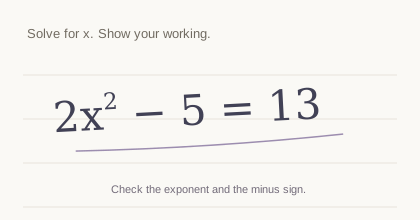
Look closely at exponents, coefficients, minus signs and variable names. One small symbol can turn the question into a different problem.
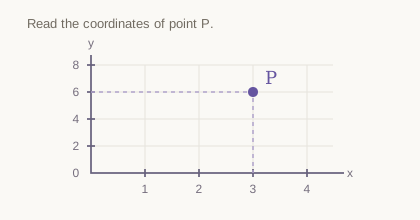
Compare axis scales, plotted values and the full instruction. Graphs can remain ambiguous; do not confirm a reading you cannot check.
Keep one complete question in focus, including its diagram, units and instructions. Crop away unrelated questions and personal details. Avoid glare and shadows.
Still JPEG, PNG, WebP or GIF images.
Up to 16 megapixels.
One or two relevant pages.
Unencrypted, readable files work best.
Each file must be under 4 MB. Very detailed images or complex PDFs may need a clearer, simpler export.
A result is more useful when you understand how to reach it. Work through the explanation, compare it with your own attempt, and use your course materials to check important answers.
Explore step-by-step math helpUpload only material you are allowed to share. Homework is sent to the AI provider to process your request. Sol stores extracted readings for the review workflow; homework content is excluded from product analytics.
Read how your data is handledClear expectations make a better study session.
Open the StudyHelpAI solver, upload a clear image and sign in with a verified account. Select Sol for the reviewed visual workflow. Accept the displayed credit reservation, compare the extracted readings with the original, then confirm them to solve.
No. Luna provides a direct visual answer. Choose Sol to inspect the worksheet readings before calculation. Sol shows extracted questions, measurements, relationships and any uncertainty the reading identified.
Do not confirm an incorrect reading. Cancel the review and upload a clearer photo or source file, then review again. You cannot edit the extracted readings in place. Cancelling before solving returns reserved credits subject to their original expiry and payment restrictions.
These can be uploaded, but legible handwriting and complete, well-lit diagrams work best. Graph scales, crowded labels and blurry notation can remain ambiguous. Compare every important reading yourself; the review does not guarantee accuracy.
Yes. Use an unencrypted PDF with one or two relevant pages, under 4 MB. If it is unreadable or too complex, export it again or upload a clear still image of the question.
AI help requires a verified account and available credits. Sol displays the total for reading and solving before you start and reserves it once. Confirming the readings adds no extra charge. See current credit prices. The illustration on this page does not make an AI request or use credits.
No. The reading and the solution can both contain mistakes. Review your source, follow the reasoning and check important answers with your class materials, calculator or instructor. Use the explanation to learn the method.
Upload → choose Sol → verify → solve → understand.
Your existing account and credit balance work here. No separate solver.